Master Copy: Erin Hanson’s “Coastal Light”

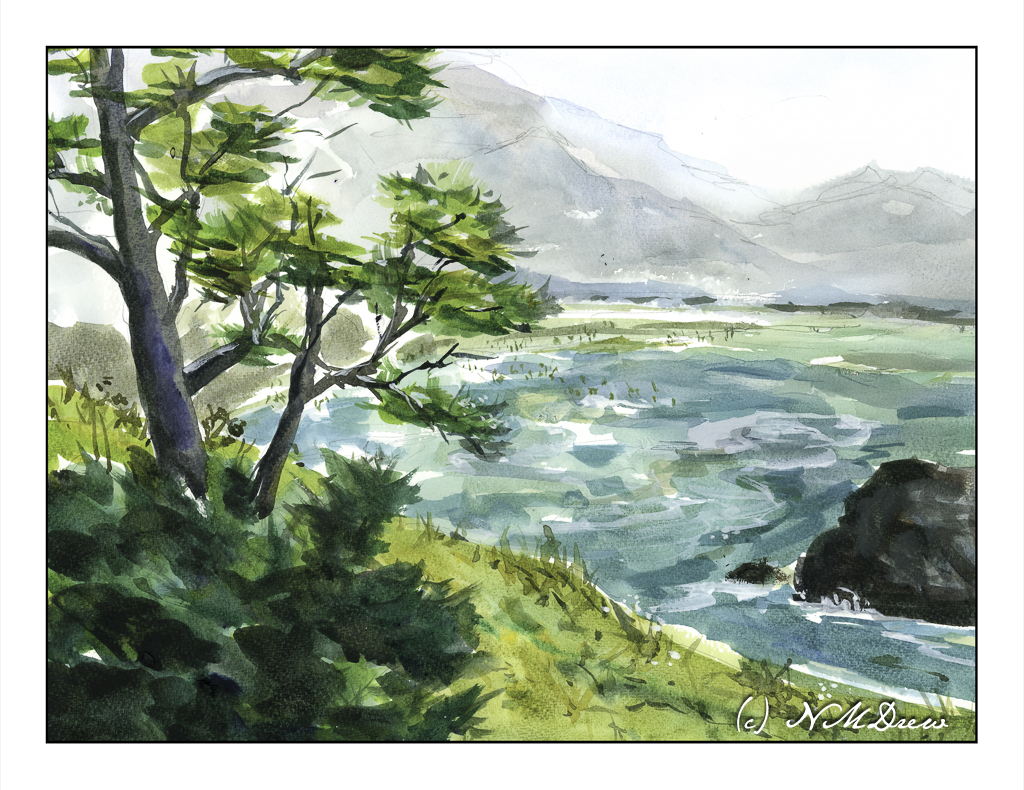
Erin Hanson painted this painting in 2017 and it measures 24×30 inches. You can find it here on her website. It is called “Coastal Light” and it shows an evening (my opinion) in Southern California sometime in the spring when the rains have come and the hills are green.

I chose this to use as a master copy because the composition is simple, and I felt I could relate to it emotionally. For me, connecting with a painting or subject matter is very subjective – if I don’t like something I am not interested. I also felt I could handle the colors comfortably.

My own painting is in oils and as I worked on my copy, obviously things shifted. This master copy measures 16×20 inches, so of course my proportions are a bit different.

A number of things drew me to this painting. First, as I stated above, was the relative simplicity of the composition. The colors Hanson uses are vibrant and the air shimmers a bit. The leaves seem to flutter in a light breeze. I like the quiet energy of “Coastal Light”. The spring evening is very gentle. Additionally, what also attracted me was the way Hanson subtly outlines the shapes of the tree trunks, vegetation, clouds and terrain. Brush strokes give a sense of direction, especially in the foreground.

Initially, I tried to paint this using acrylic paint. I laid down the initial painting about 6 months ago, and really did not like it. Acrylic paints are not easy to use as they dry so quickly. I found the painting rather harsh and was thinking of painting over it with something else. Instead, it sat in the garage, ignored. And, I think, that was not a bad thing.

When my current painting class began again, I decide to pull the painting out and re-do it using oils. I didn’t have Hanson’s painting to refer to as I had forgotten where I had found the image. So, I just painted over the acrylic paint with oils, using the acrylic painting to guide me into finishing it. This took me about a month of classes once a week, and only last Tuesday did I finally consider it finished and not needing anything else.

I finally found the image of “Coastal Light.” Comparing my version to hers, I found that what I really like with both are the way the tree trunks are delineated using light colors to show light without overdoing details. Foliage, too, was something which pleased me in both paintings, with Hanson’s being a bit more expressive than mine – I am a dabber, and my foliage is definitely dabbed! When it came to bigger areas of color, such as the distant mountain, foliage, and foreground, my dabs got all mushed together to create better color masses and shapes.

For me, a master copy is to learn whatever I learn. I have no goals specifically in mind. What I came away with was an awareness of my need to stop dabbing and become a bit more bold in applying areas of paint. My dabs work well when I mush them together as subtle color variations can show up. I really liked doing the tree trunks and the foliage, working to get a sense of the direction of light on the trunk and the movement of the fluttering leaves. Achieving a sense of depth using the contrast of shadows falling across the path – lighter in the distance – was a bit of a challenge but my lovely instructor, Barbara, really helped me see what I was not seeing.

An oil painting master copy is sort of a luxurious event because time is on my side. Watercolor master copies, such as with Seago, are very immediate as watercolor is simply watercolor! Doing this, my first master copy in oils, I have come away with a better sense of how to paint a mood and light. Even better, my level of frustration was very low once I began working in oils – acrylics really cause me to get agitated because I feel like I have to work so fast to do this or that before they dry. Altogether, I enjoyed this and learned more about how to use my paints. For me, the trees were the best part of this adventure.

Erin Hanson’s colors always appeal to me, and, of course, color is subjective. Her sense of composition is one of her strong points, and her brushwork is enjoyable because it creates an energy that works well with much of her subject matter. I may try another one, working a bit differently than I did here, because the entire process was both challenging and satisfying. On top of that, she loves landscapes and the great outdoors – much preferable to portraits I think!

Why a Master Copy?

Copying the work of a master painter, as I have been doing with Edward Seago (and others) of late in watercolor, is a time-honored tradition in learning how to do things. There is a lot to be learned while doing a master copy, and doing a master copy imprints itself on the copy-ist in many ways. Search “why make a master copy” on the internet, and you will find a million bazillion results.

Here are some reasons from Cecile Yadro’s website:

  • Beat the art block
  • Develop your skills
  • Get creative inspiration
  • Learn to self-critique
  • Improve your observation skills
  • Develop patience and focus
  • Develop muscle memory
  • Build confidence

These are all great reasons, and some you may not even expect, such as muscle memory! For me, these are salient reasons, and even more importantly, open my mind up to a way of doing things and seeing things that I probably never have otherwise considered. By nature, I am not analytical but reactive – patience is not one of my virtues and frustration is not something I like reacting to. As a kid, well, let’s just say my inability to handle frustration made me the “bad” child!

Watercolor master copies are easy enough to do, as is with any water-based medium which dries quickly. I say “easy” because once done, I can scan them and look at them, and critique them more objectively. I see things I miss when looking at a non-digitized painting. (Need to work on that!) Oil painting, though, is a different story. Oils you can paint over, you can use quick-drying mediums, you can take forever to decide something is finally “done”. I have been working on three oil paintings, master copies of three different artists: Erin Hanson, Michael Chamberlain, and Maggie Siner.

Today let’s learn a bit about Erin Hanson.

I first came across the work of Erin Hanson about 3 years ago. Cruising through who knows what, I found her site and learned that she created a painting style called “Open Impressionism” which, as her website states, “continues the work of impressionists and post-impressionists.” It does insofar of the radical use of color to capture light and movement. There is a freshness here that I rather like, and the bright colors appeal to me. Her ability to create good composition is evident, too, and these make for attractive paintings. Below is a lengthy YouTube video which will acquaint you with her work:

YouTube has a number of videos by and about Hanson. Explore at your will. As well, check out her portfolio of paintings on her website – you can see her evolution over time as well as decide for yourself if you like her style. As with any artist, some paintings will appeal to you more than others.

Along the Riverbank

When we lived alongside the Rancocas Creek in New Jersey, the shores of the creek were slick and muddy and the underbrush along the edges of the creek were thick and tangled and nearly impossible to get through. Of course, kids worked their way in – as did I – and paths led to some wonderful places. We had a tree house in a huge willow tree and a rope swing over the creek. If you were brave enough, or foolish enough, you could jump into the creek from the rope. I never did that! Instead, I traipsed around in the mud, pushing my way through stink weed and elephant ears (our names), losing my shoes in the mud (and getting spanked for that!), and getting bitten by mosquitos.

Such memories are the inspiration for this watercolor. I wanted to show the crowded growth along the banks, the greenish water, et cetera, et cetera. I also wanted to make it a simpler painting, trying to do masses of color without all these details. I don’t know if that would have been possible but I think I will try this painting again, but I need to think about it and play a bit to get it. As well, the whitish bark of the trees, living and dead, were hard to paint – decisions to paint around, then tint, or tint and then paint around them drove me a bit to the frantic side of my personality, which already tends towards hysteria.

Anyway!

I also used a new-to-me watercolor paper, made by St. Cuthbert’s Mill in England. I am not sure as to its fiber content, but it is archival. The texture is nice, size is good at 11×15 inches, and worked really well with the paints and water. Color could be lifted, as in the reflections of the trees on the left in the creek. So far I am pleased with this paper and definitely plan more paintings using it.

Colors were, again, of a more limited and older tradition: Hookers, ultramarine and cobalt blues, yellow ochre, siennas. A bit of alizarin and both cad red and yellows were thrown in for mixing.

While this painting is busy, it works okay for me. I think the challenge to simplify it will be worth the time and energy I spend to do it.

Carolina Sea Shore

Beaches differ so much, but one thing they have in common – the ocean! The shore between land and ocean can vary, from rough and rocky, to wide and sandy and flat, and everything and anything else.

Once more, the simplicity of Seago’s watercolors was in mind, but my own rather picky or detail-oriented tendencies made simplification really hard to achieve. Along this shoreline is seaweed and other detritus, differing levels of shoreline, dunes and grasses. In the distance is an opposite shore – island or land arm of a bay? I had to force myself to stop!

And there is a giant bird shape in the middle of the sky . . . funny how you don’t see these things – at least I don’t – until I scan the painting and look at it days later. Maybe I’ll fix it, maybe I’ll leave it.

Again, a limited palette of ultramarine, Hooker’s, ochre and sienna. I also used a bit of phthalo blue, an as a touch-up, white gouache. Hahnemuhle 9×12 140# CP paper.