
I don’t think I would mind this view on a daily basis, along with a good cup of coffee!

I don’t think I would mind this view on a daily basis, along with a good cup of coffee!

The beach north of Morro Rock is wide, flat, expansive, and popular. The late afternoon found the beach still filled with families and kids playing in the water. Definitely a great beach!

The original of this image had the poppies in the background burnt out against the sky. In LR, I created 5 virtual copies, each with a + or – value of 1 or 2, creating virtual bracketing. I exported them as tiffs. In Photomatix, I blended them to create a single image. The last move was into LR6, creating a slightly warmer cast, creating a gradient from the upper left to lower right (about half way). In the gradient, I adjusted the temp and tint sliders to adjust the sky. Final touch was a bit of clarification and dodging of the poppy in the foreground.

Panoramas are a really fun thing to do in photography, and there are a lot of ways to do them, and why or when to do them.
For me, the panorama is best for landscape, just because I do not tend to do portraits. Bokeh panoramas are the brain child of Ryan Brenizer – he uses them specifically with his wedding photography. (If you go to his website, scroll to the very, very bottom – there are some links for his methodology.) Panos can have great DOF, or shallow – Brenizer specializes in shallow to isolate his couples in a landscape or cityscape. Be aware, that a shallow DOF can work in a landscape, too, to isolate your subject.
Only one rule, in my opinion: set your camera to manual, focus on your subject, set your technique (iso, f/stop, time), and then shoot. And shoot. And shoot.
Overlap those pictures! Use the guidelines in the viewfinder to help you. Go back and take some extras if you think you missed an area – but even then, you might. Oh, well.
Below is a mosaic of all the images I took for the final panorama shot seen at the end of this rather long post – there were about 45 in all; here I reduced them to 1000 pixels for easy viewing from 16 meg images. If you click on an image, it will pop into a slide show for you.


For landscapes, you can handhold your camera. Bokeh panoramas can also be handheld. There may be some distortion when you look up and click, or look down; the end result can be interesting or awful, but it can be cleaned up in post. For longer exposures, though, the tripod is best.
HDR panoramas can be done a few ways. Set up your camera to do the +, 0, – images and take them that way, or do three different panos at different exposures, and blend the final ones in your software. You can also create different exposure levels in LR, such as +1, 0, -1 and then merge them. I’ve been happy with the results all 3 ways, but find that the ones which require the least work (the last two) are less frustrating. If you have to sort out a lot of bracketed photos to create the initial panos, it can get a little crazy-making. The point here is find what works for you.
For a bokeh panorama, put your area of interest into focus. For Brenizer, the couple is in focus. Use your largest f/stop, such a f1.8 or f1.4. My suggestion is to take the couple first, or the main area of interest. From there, keeping the same exposure, click away, developing some kind of grid pattern – like right to left, up and down. Get more into the photos than you think you need because . . .
. . . because when you do a panorama, you can crop it into a lot of different pictures! I like doing this to look at compositional elements, such as lines and color.
That said, here is what I do when I shoot:
But, if you are out on a photo shoot and have a lot of pictures that are not a pano, you need to separate things. I take a picture of my hand in between the panos – totally out of focus but it shows me a beginning and an end point. Here is an example of my blurred-out hand.

So, back to the laboratory to process those pictures. This is my process, using LR and Photoshop.
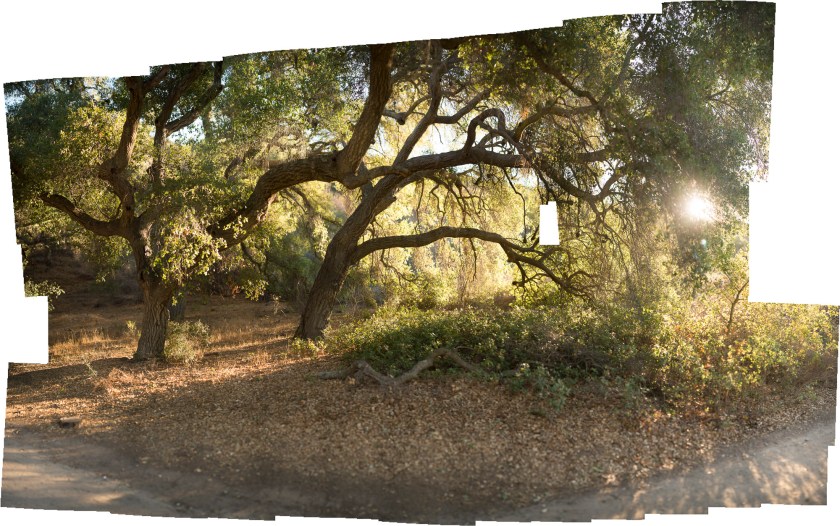
You see a gap in the above pano – the Fill in PS did not do a good job – so, I ended up cropping around it. This next pano was pretty nice – no gaps.

Cropping the above image produced some gaps – but those are easily filled in with PS or just cropped out.

Panoramas are really quite easy – all you have to do is play a bit. I am not a sophisticated post-processor, and certainly cannot do the magic a lot of people do in PS, but I can do a few things . . . like use the Lasso tool and Intelligent Fill to fix gaps . . . Below are my final edits, some subtle, some not too subtle, of my final image. To see each one individually, start the slideshow by clicking on an image.


Depending on what I want to do, I do my post processing in LR, PS, PPS9, Photomatix, and Nik. Every now and then, something else will stray in.
There is always something seen before that, seen again, is totally different. Normally when I head out to Wildwood for an evening photo shoot and walk, I go toward the open spaces. Last night, I decided to head toward the little creek that runs through a small oak wood, and went in both directions. As I perambulated (isn’t that a great word?!), I looked ahead, and I looked back. The sun was lowering in the western sky, and as I looked, the light was shifting and changing in beautiful ways. The light was fun to capture as it bounced down the hillside and into the small canyon. Click on an image to start a slide show.


 Ink, Yarn & Beer