
One thing I find I like about HDR, if not pushed too far, is that it can create a good sense of the original light without a loss of detail. I still have 8 days left on my trial version of HDR Express, so that is the toy I chose to play with this morning. Yesterday’s picture shooting up into the tulip tree was the subject.
Manipulating images in other software, such as Photoscape or FastStone, allows me to lighten and darken them. I did this with the idea of merging multiple images in HDR Express, but HDR Express likes being boss, and reads the metadata from the same 3 images, and shuts its processes down – it realizes that you’ve got the same picture. That is a frustrating limitation. Removing all the metadata doesn’t change the situation. However! There is a work-around that is rather nice.
In Lightroom, open up the image you want, adjust the image so it is dark, and then right click on the image and export to HDR Express. It then pops open HDR Express, and HDR Express takes a few minutes, and creates 5 images, ranging from dark to light for your viewing pleasure. The differences are not immense, but if you watch the histogram on the upper right of the screen, you can see what the program is doing to your picture.
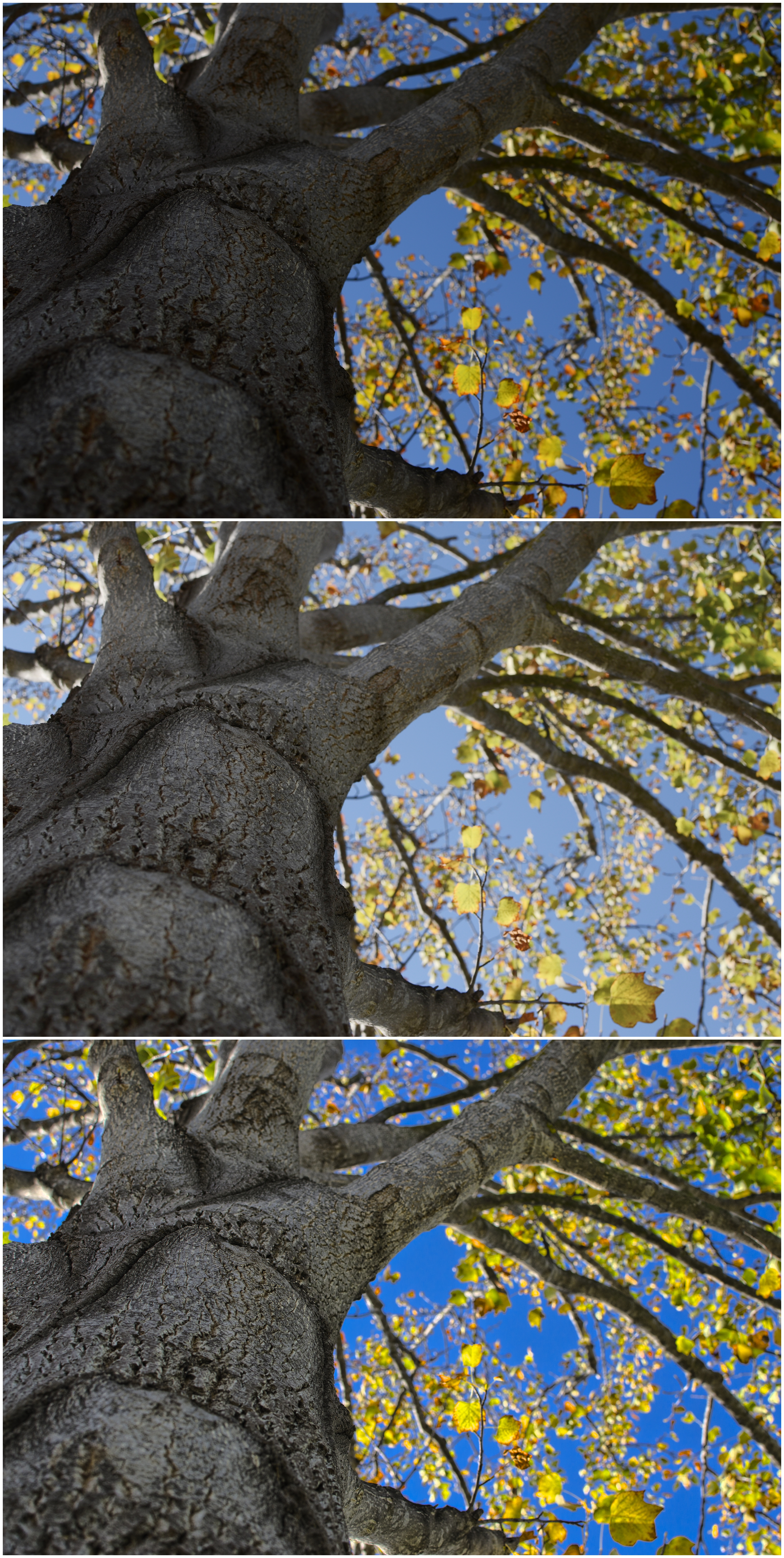
Below is a composite picture of the tulip tree out front. The top one is the original one I shot, which was dark to begin with, so I didn’t change it when I sent it to HDR Express via Lightroom. The middle one is my adjustment in Photoscape, which did a good job, but the intensity of the blue sky was a bit lacking. Finally, the bottom image is the one I exported to HDR Express, and it produced a rather pleasant image, with all the detail of the trunk, while retaining the colors of the leaves against that intensely blue sky I saw in my lens.
The Nikon Hit Man doesn’t like the idea of having to use lighting or post-processing to get the perfect image. I disagree. Post-processing is often necessary, and has been done forever by artists in the darkroom – dodging and burning are forms of post-processing. The thing is, sitting at a computer putzing with software is pretty dull stuff, so for us restless souls, it’s something of a nuisance. In a darkroom, you are moving around, not sitting at a desk. Big difference. Modern technology has its points, but movement is not often one of them!
I am in agreement, though, with the Nikon Hit Man about the original image: it should be as perfect as possible. This means you think about it before hand (if you can) by choosing the right lens, exposure settings on your camera, and so on. Not always easy to do – or remember – because there are so many things you can forget as well! And that is why programs which allow image manipulation are assets to the photographer. Nonetheless, for people who like the physical realities of art, software is more challenging than trying out a new medium, and often far more frustrating.
Life isn’t perfect, but we adapt!


 Ink, Yarn & Beer